When it comes to promoting yourself on social media as a musician, there is still one staple that you simply cannot afford not to use – Facebook. However, Facebook is now so universal that some musicians misunderstand its subtleties and don’t properly take advantage of them.
As such, we’ve put together this ultimate guide on how to promote yourself as a musician on Facebook – covering everything from how to create a Facebook band page step by step, to growing your following and making the most of Facebook’s features. Whether you’re starting from scratch or looking to improve an existing page, this guide has you covered. But first, let’s get a better understanding of where Facebook comes from.

The history of Facebook
How Facebook became the cultural phenomenon it is today has been the subject of everything from online articles to the major Hollywood film The Social Network (written by The West Wing creator Aaron Sorkin and starring Jesse Eisenberg). However, here is a slightly more succinct look into its past.
The origins of Facebook have always been somewhat unclear and, to some, controversial. Then 19-year-old Harvard sophomore Mark Zuckerberg started thefacebook.com in February 2004. It came after he tried several other ideas, with sites like Facemash (a site for rating his fellow students) proving popular on campus.
It’s been alleged several times that the idea was not an original one. The plans for a Facebook-style social network for Harvard were allegedly created by Cameron Winklevoss, Tyler Winklevoss, and Divya Narendra, who went on to sue Zuckerberg. Facebook would eventually settle their suit.
Originally only being open to Harvard students, Facebook would go on to be available right across the Ivy League. After seeing mass sign-ups, Facebook would eventually be made open to the public. The company would receive its first “angel” investment of $500,000 from Peter Thiel, who was introduced to the company by Napster co-founder Sean Parker.
Expanding rapidly over the coming years, Facebook would go on to make Mark Zuckerberg one of the world’s wealthiest individuals. Though its functionality has continually changed over the years – including everything from online marketplaces to short-form video Reels – it has still stayed true to its core principle of being a site for social networking.
Do musicians need a Facebook Page or a personal profile?
Before we get into the tips, it’s worth clearing up a key question: should you promote your music using a personal Facebook profile or a dedicated Facebook Page? The answer is almost always a Facebook Page, and here’s why:
- Anyone can follow you – Fans can “Like” or “Follow” your Page without you having to approve them as a friend, meaning your content can reach a much wider audience.
- Multiple admins – Band members, managers or social media coordinators can all be given access to post and manage the Page without sharing your personal account.
- Analytics – Facebook Pages give you access to detailed insights about your audience, reach, and engagement – unavailable on personal profiles.
- Call-to-action button – Pages let you add a CTA button (e.g. “Listen Now”, “Book Now”, “Contact Us”) directly below your cover photo to drive traffic where you need it.
- Facebook Ads – You can only run paid promotion campaigns from a Page, not a personal profile.
- Your personal information stays private – Fans see only what you choose to share on the Page, not your personal photos and updates.
Ten top tips for musicians starting or running a Facebook page
1. Research similar accounts
This is especially important for new pages but can also be useful for those with an established following. It doesn’t matter whether they are huge international names or local independent musicians; you can still learn from their pages. Find bands in a similar genre to yours and check out what sort of content works for them. Before you have a big audience of your own to get this information from, this can be a great place to start when looking for leads on good content.
Don’t forget to share content from other local bands. Music doesn’t always need to be cutthroat; if you help out other local bands, they are just as likely to help yours. However, never use images without crediting their original owners.
2. Secure your name
Once you’ve decided on a band name, you should always try and secure as many relevant social media handles as possible. Even if you don’t plan to use them straight away, at least they then belong to you and not someone else!
You can start a Facebook Page for your band by following these steps (you’ll need a personal Facebook account first):
- Go to facebook.com/pages/create
- Enter your Page Name – use your band or artist name
- Enter your Category – type “Musician” or “Band” and select the relevant option from the dropdown
- Add an optional Bio – a short description of your music
- Click Create Page and you’re live!
Once your page is created, make sure to fill out the About section fully – including links to your website, Spotify profile, and other social media accounts. The more complete your page, the more professional it looks to new visitors.
3. Select a professional URL
Facebook allows its band pages to pick their own web address that gets tagged on the facebook.com site address. When doing this, try and keep it looking professional. If your original name is taken (and you should always research this before naming your band), then using something like /mybandnameUK or /mybandnameOfficial is going to look much better than some of the alternatives that Facebook is going to suggest (adding a bunch of numbers, for instance).
4. Select strong header & profile images
Facebook header and profile pictures are a very important part of creating an attractive-looking profile. For best results, use the following dimensions:
- Profile photo: 170 x 170px (on desktop)
- Cover photo: 820 x 312px (on desktop) — note that the image will be cropped to 640 x 360px on mobile, so keep key elements centred
Facebook also lets you use a short video clip (between 20 and 90 seconds) as your cover image, which can be a great way to grab attention. If you’re only just starting out with your band, see if you can get a professional photographer booked in to take some pictures of the group, either at a photography studio, gig, or recording session. These can all make strong profile images.
5. Set up your call-to-action button
One of the most underused features of a Facebook musician page is the call-to-action (CTA) button that sits just below your cover photo. This button lets you direct visitors to take a specific action, and you can customise it to say things like:
- Listen Now – link to your Spotify, SoundCloud, or music website
- Book Now – link to your booking enquiry page (great for gigging musicians)
- Contact Us – link to a contact form or email address
- Watch Video – link to your latest music video on YouTube
New visitors are most likely to look at your Page once – make sure your CTA button tells them exactly what you want them to do next.
6. Consider whether to sync with other social media
Facebook’s Meta Business Suite allows you to manage and cross-post content across both Facebook and Instagram from one place, which can be a real time-saver. That said, while it is convenient, you may want to consider carefully whether blanket cross-posting is the right move.
There is an argument that all social media platforms are different and should be treated as such. Visual content may work better as an Instagram-only post; content with many hashtags may suit Instagram more than Facebook. Posting too frequently or using content that doesn’t feel native to the platform can also put off your audience.
7. Get to know your audience
If you already have a Facebook page for your band or music project, it’s important to establish what kind of content your audience will react to. What time are they likely to be online for big announcements? What kind of mix of content will they react to?
Facebook offers detailed analytics through Meta Business Suite (and Page Insights within it) to track where your traffic comes from, when your audience is most active, and how your content performs. Use this data to identify your best-performing posts, find the optimal times to post, and understand the demographics of your fanbase. The more you use these insights, the smarter your content strategy will become.
8. Consider your content mix
Many high-profile Facebook pages post content that is specifically related to them but mix in some generally entertaining content that may be more tenuously linked but is likely to garner a response from the audience. For musicians, a healthy content mix might include:
- Behind-the-scenes photos and videos from rehearsals or recording sessions
- Upcoming gig and tour dates (use Facebook Events – more on this below)
- Reposted fan photos and videos (with credit)
- Short video clips and Facebook Reels for quick, shareable content
- Polls and questions to spark conversation with your followers
- New music releases, music videos, and streaming links
9. Promote gigs with Facebook Events
Facebook Events are one of the most powerful tools available to musicians, and yet they’re massively underused. Creating a Facebook Event for each gig or show allows you to:
- Share all the key details (date, time, venue, ticket link) in one place
- Invite your followers directly and remind them as the date approaches
- Reach friends-of-friends when attendees share the event
- Collect RSVPs to gauge interest ahead of the night
Make sure every gig has its own Facebook Event linked to your Page — it takes minutes to set up and can meaningfully increase your attendance.
10. Watch the use of hashtags
As alluded to in a previous point, each social media platform is radically different. While Facebook now allows hashtagging, it is still something of a novelty and adding as many as you would on, say, Instagram may not be a good idea. On Facebook, one or two well-chosen hashtags tend to perform better than a string of them.
11. Utilise Facebook Live and Reels
Facebook Live remains one of the best tools available to musicians – for a start, it sends a notification to all of your followers the moment you go live! Try live streaming parts of gigs, rehearsals, or big announcements. Facebook’s algorithm also tends to favour Live content, giving it greater organic reach than standard posts. Save your Live videos to your page afterwards so they continue to drive engagement.
Facebook Reels – short-form video clips of up to 90 seconds – are another format the algorithm is currently pushing heavily. Behind-the-scenes clips, quick song covers, or short teasers for new releases are all great uses of Reels. Just don’t use either format so often that it loses its impact!
12. Keep it updated regularly
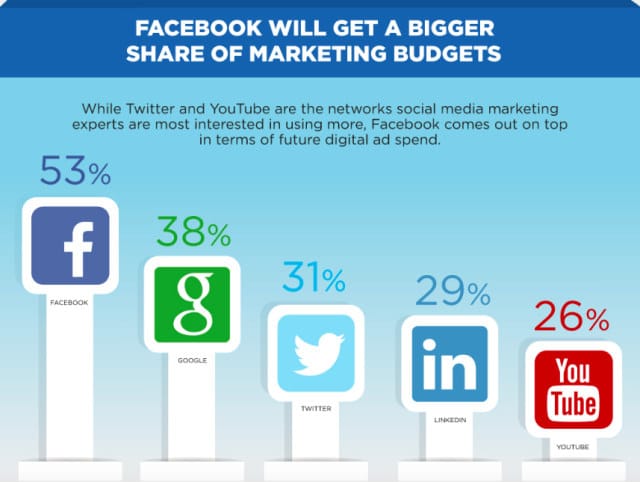
Far too many bands seem to abandon their pages after their first few posts or let it go months at a time before posting. One of the best ways to ensure you keep your audience engaged is by regularly posting content. Big companies recognise the worth of Facebook – so should your band!
Try assigning one member of the band to each form of social media to spread the workload. You can also use Meta Business Suite to schedule posts in advance, so your page stays active even during busy touring or recording periods.
Facebook pages to like
Here are some great Facebook pages worth following as a musician – whether for inspiration, industry news, or support:
If you enjoyed this blog, you may also want to read the Top 15 Facebook Groups for musicians!
Do you have any good advice for musicians on Facebook? What do you find works well for your band? Leave your thoughts in the comments below…